

Anúncios
Plex is an incredibly popular media streaming service that allows you to watch your favorite movies and TV shows from the comfort of your couch. Plex Plugins are a great way to enhance or expand on Plex’s features, but how do you find them? How do you sideload them onto your server? This article will cover everything from Plex plugins, how to install them, and what they can offer in terms of added functionality.
Plex offers plenty of functionality without the need for plugins, but you can further enhance that experience with some Plex plugins. Although 3 years ago Plex shut down its plugin directory, leaving users with no other option but to sideload plugins. In our article today, we offer a list of the best Plex plugins currently available and share the step-by-step process for sideloading them on your server.
Anúncios
How to Sideload Plex Plugins
1. Download the plugin file. Unzip it in a folder if the file is “ZIP” archive
2. Check for the .bundle file and make sure that its filename does not contain any additional letters.
Anúncios
3. Copy the plugin bundle into the Plug-ins folder in your Plex Media Server. This can be found at one of three locations –
- Windows:
%LOCALAPPDATA%\Plex Media Server\Plug-ins - macOS:
~/Library/Application Support/Plex Media Server/Plug-ins - Linux:
$PLEX_HOME/Library/Application Support/Plex Media Server/Plug-ins
4. Restart the Plex Media Server to allow newly installed plugins to take affect.
Note: Some plugins do not work with even a straight forward installation method and as such, additional instructions might be necessary.
Essential Plex Plugins
1. WebTools
WebTools is a collection of utilities that provide features to manage your Plex server more efficiently, but it is not just one plugin. A dedicated Plex server is a great way to get the most out of your home video library. It’s free, easy to set up and it has an integrated web-server that seamlessly supports streaming on any device without having to buy a separate router or deal with detecting different ports like you would do for other streaming services. Besides providing plugins, the server also hosts a few apps and channels that you can download to your Plex account. In addition to some other various management options, there are logging tools, management modules, and subtitle management available for installation on your server. One of the best types of plugins you can install is definitely this one.
2. Plex Export
If you are often asked to share media on your Plex server, but don’t want people to have access to it, the Plex Export plugin is a lifesaver. Plex plugins help you generate and share links to view your stored media—such as movies, TV shows, music albums or photos—with others. Simply put, it allows you to create an HTML page with information about the media stored on your media server, which you can then share with others. It gives live filtering for each section and a detailed look into shows and movies, along with the option to filter content by genre, actors, etc, and sort titles by name, year, rating, etc. Plex plugins require PHP to function, and if running in the Home mode with authentication enabled, it needs a token from their support page.
3. Tautulli
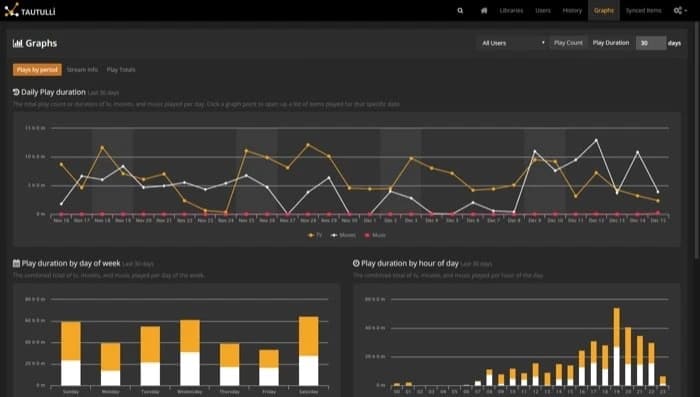
Tautulli is a must-have plugin/utility to help organize what’s on your server. It is essentially a third-party application that you can run alongside your media server to monitor its activities and keep track of various statistics. It can track some important statistics, including what was watched and where. Further, to make it easy to comprehend these statistics, the service presents the data in an organized manner using graphs and tables. Aside from basic statistics tracking, it also provides options for viewing and deleting content on your server, detailed information about media syncing, monitoring current activity on the server, and creating custom scripts.
4. Plex-Sync
Plex-sync is an important Plex plugin option that has many of the same features as Plex Export. The plugin helps sync content across different servers, ensuring that the content on one of your servers has a synchronized watched/seen status with other Plex Servers. This plugin allows you to sync media libraries served by both local and remote sources. It utilizes your server IDs along with the library ID on either server in determining which databases should be synced and managing the synchronization process accordingly. If you would like to automate the sync process and avoid the need to enter commands every time, one solution is using a program like Cron.
5. Sub-Zero
For those of us who watch content across different continents and in foreign languages, the Sub-Zero plugin is an ideal utility to have on your server. Plex offers subtitles for a wide variety of content, with some exceptions. It is possible to use third-party plugins to install subtitle files on your Plex server via an SSH account, through the command line or by using Windows software. Sub-Zero is a Plex plugin that searches up to 10 individual subtitle provider sites and APIs to select the best one of the lot before downloading it, and it features its own background task scheduler.
That concludes our listicle.
If you use Plex for media organization and consumption, you can get much more out of the app by installing a few plugins. Besides the plugins listed in this article, you can also download and install other Plex plugins that you prefer using the instructions further into the article.









